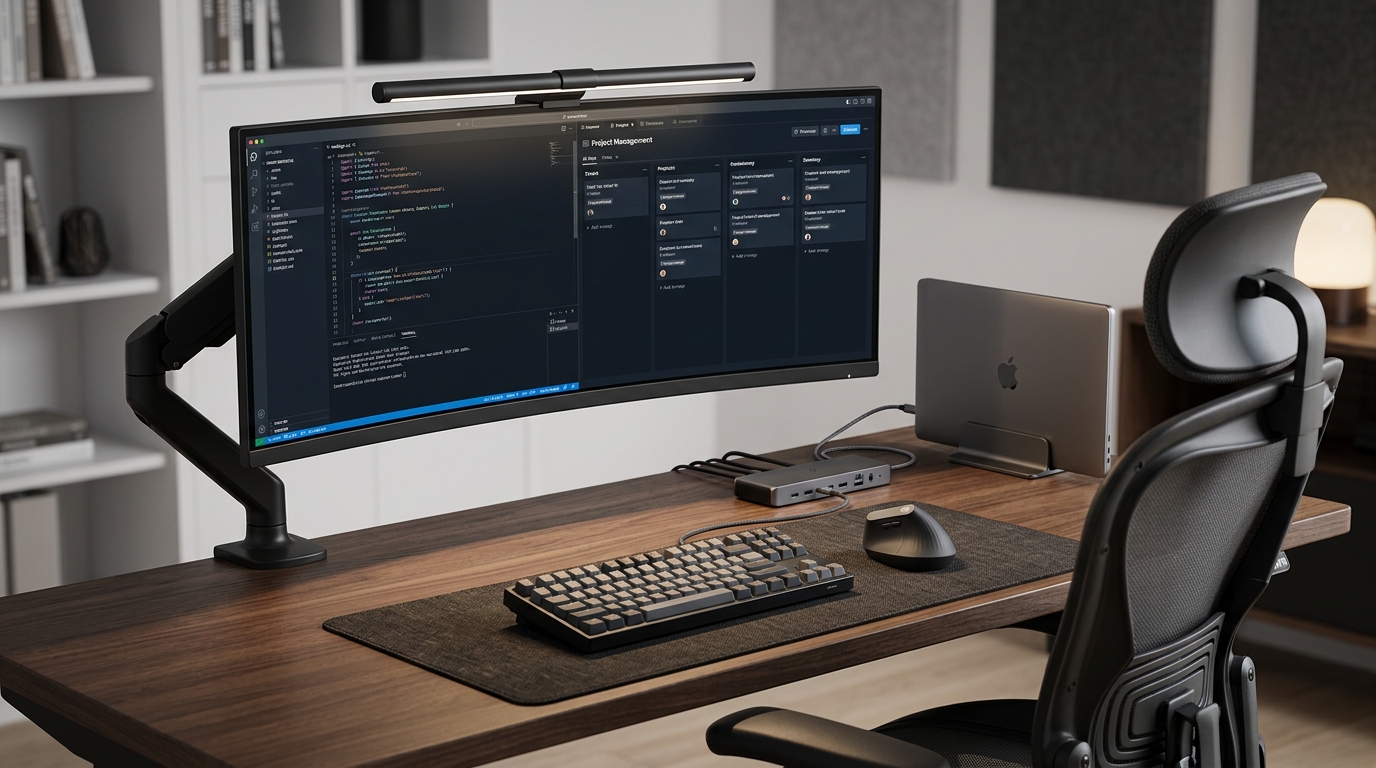
True productivity is not based on how many hours you spend in front of the screen, but on the quality of those hours. In a remote work environment, your desk is your interface with the world. If that interface is clumsy, noisy, or painful, your performance will inevitably suffer.
1. Space Psychology: Cognitive Load and Order
Your brain is constantly scanning the environment. Every object out of place, every hanging cable, and every accumulated paper is a unit of attention your brain spends on processing visual noise. Science calls it External Cognitive Load.
To reduce it, we apply the "Blank Desk" rule: at the start of each complex task, your visual field should contain only the elements strictly necessary for that task. Everything else is a potential distraction.
2. Physio-Postural Ergonomics: The Foundation of Performance
Physical discomfort is the ultimate conscious and unconscious distractor. If your body spends energy readjusting its posture every 15 minutes, your Deep Work capacity drops exponentially.
- Ergonomic Chair: Must feature dynamic lumbar support, 3D/4D armrests, and a synchronous mechanism. The goal is to keep feet flat and knees at 90°. See chair guide.
- Standing Desk: Alternating between sitting (60-70% of the time) and standing (30-40%) reduces metabolic fatigue and maintains alertness. See desk guide.
3. Visual Space Management: The Digital Battlefield
Screen real estate is your digital work area's equivalent. How you organize your windows determines your information processing speed.
- UltraWide Monitor (34"): The optimal solution to avoid visual interruption from central bezels. It allows for working comfortably with 3 vertical windows.
- Dual Setup: Recommended if you need to completely isolate reference tasks (metrics) from active production areas (coding or writing).
Using an articulating arm: Freeing the monitor base not only clears useful surface area but also allows for tilt adjustment to reduce eye-straining glares.
4. Input Peripherals: Precision and Health
| Peripheral | Key Features | Flow Benefit |
|---|---|---|
| TKL / 75% Keyboard | No numpad, programmable layers. | Reduces arm travel when using the mouse. |
| Vertical Mouse | "Handshake" position. | Prevents carpal tunnel syndrome. |
| Monitor Light Bar | Asymmetric light over keyboard. | Eliminates screen glare and eye fatigue. |
5. Connectivity: The "Single Cable" Rule
The technical goal is to achieve simplified connection via a Thunderbolt or USB-C Docking Station. Centralizing monitors, peripherals, and power delivery into a single cable connected to your laptop reduces the mental friction of "plugging everything in" every morning.
Complement this with strict cable management by hiding transformers under the desk. See cable management guide.
6. Ambient Comfort and Biophilia
Don't underestimate the power of the senses. A productive environment must also be a pleasant one:
- Dynamic Lighting: Use cool light (4000K-5000K) for focus tasks and switch to warm light at day's end to avoid disrupting your circadian rhythms.
- Acoustic Isolation: Active Noise Canceling (ANC) headphones are crucial in shared homes to maintain mental isolation.
- The Green Touch: Introducing a real plant reduces stress and purifies the air, improving brain oxygenation.
5S Methodology Applied to the Desk
To maintain this system, apply these 3 steps every Friday upon finishing:
- Sort: Remove from the table what you haven't used all week.
- Set in Order: Every cable and accessory must have an assigned place.
- Shine: A dust-free surface invites you to return on Monday with enthusiasm.
Auditor's Verdict
A high-performance desk is an integrated system, not a sum of expensive objects. Always prioritize postural health (chair and screen height) and visual order. Once your body doesn't suffer and your eyes aren't distracted, your brain will do the rest of the work for you.